Copying Photographs   


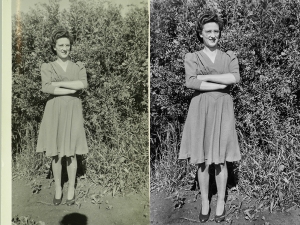
Violet Walch copy

This week I noticed some pictures that were posted on a Facebook page. They were old, family pictures that were low quality, which I thought were more from the poor copying techniques of the person who posted the photos than a problem with Facebook, and I am sure the person that added them to her FB page in spite of the shoddy reproductions thought she couldn’t do better. Seeing those poor quality images reminded me of an article that I wrote about copying old photos some time ago, and wanted to remind readers how to do this.

In the article, I had been asked if I could make quality copies of old photographs that a family wanted to use for a book of genealogy they planned on publishing. They required image files with enough quality for good enlargements, and reproduction, and had tried to copy several images using inexpensive home scanners meant for documents (not photographs), and thus far were only able to produce pictures that lacked detail.

I recall they told me they also tried copying the photographs with their little digicams, but that exercise resulted in bright, white reflection spots from it’s flash that obscured features giving them unacceptable results.  A camera with an on-camera flash will produce glare on reflective surfaces, and inexpensive document scanners rarely produce good facial identification of old family photos that have languished in boxes for years. The result was much the same as those old, family photos I saw on Facebook.

When I copy photographs I lay the photographs flat and mount my camera on a copy stand that I have had for years, (a sturdy tripod would also do nicely) and use a small level to make sure the camera lens and the photographs are parallel. I use two photographic umbrellas to diffuse the flash. If I didn’t have the umbrellas I could also get reasonable results by placing some translucent material in front of the flashes, or by bouncing the light off large, white cards.  Two umbrellas allow me to balance the light. Then I make a test shot to check the exposure for reflection. In any case, the light needs to softly and broadly, not sharply, expose the old photograph’s surface.

The wonder of digital technology is that it allows a photographer to quickly review the image and retake it if needed. I also recommend taking several shots at different apertures.  And, of course using the camera’s Manual Mode. I prefer working with slightly under exposed image files. That way I can bring the detail up in postproduction without loosing the highlights in the original photographs.

If the next question readers ask is, “What kind of camera?” my answer will be that it depends on what is the desired outcome. If the final image is going to be a print, or something that is to be big enough to identify a person in the background, the file needs to be reasonably large. I prefer a DSLR, but for a small website image, a digicam that will accept an off-camera flash will do just fine.

If there isn’t access to an off-camera flash then wait for the opportunity to photograph the picture on a “flat” overcast or cloudy day.

The final step for me is PhotoShop, (there are several other programs that will also work) which I use to colour balance (and change a sometimes faded old photograph), and then go on to use for cropping, increasing contrast, and sharpening.

One could purchase an expensive scanner that takes up more room on the desk. But photographers that have already invested in their camera and have lenses that work perfectly well, (which I think are faster to use than a scanner) are perfectly capable of producing very high quality final images.

Copying Photographs and Making a New Year’s Calendar

I was given an old photograph to copy, and retouch, in time for a Christmas present, which was not a big job.  All one needs is a camera, a lens that can focus close up and a tripod. 

My client had tried unsuccessfully to use a scanner, but I think most digital cameras have a better resolution, and will make a sharper enlargement unless the scanner is one of the few, expensive, high quality models specifically designed to copy film and photographs. All I needed was to select a window in my home with indirect light, and turned off any lights that could alter the proper white balance. My advice is to select ”daylight” instead of “auto” white balance on the camera.

 I placed the photograph on the floor, and set up my tripod, and made sure I didn’t have any shadows falling on it.  I then prepare the camera for readiness by using a level against the front of the lens.

 I usually like to take several exposures that start two stops under exposed, and eventually go to two stops over exposed, a range of five stops, to ensure that I have a lot of exposure choices when I open the image in PhotoShop for editing. I also prefer to release the shutter by using the camera’s self-timer so I didn’t get camera shake.  I retouched using PhotoShop, selected a cloning tool to remove scratches, corrected the old photograph’s faded colour, sharpened the image and made a print.  As I said, it is not a big job.  You may have an old photo that is starting to fade and crack that records something of your family’s history.  Get out your equipment and use my notes as a reference and start copying them.  This is a good project for the New Year.

 Do I write about this next topic every year?  Yes, I do, if only to remind photographers that this is a good and fun project in which to partake.

 Every December my wife and I start preparing for our January calendar, and we like to start January off with a photo that sets our mood for the New Year. Readers know my wife, Linda, and I, always photograph our own monthly calendars. We generally alternate responsibility each month and January will be Linda’s turn, and that will be special because she will be using her new Nikon D300s for the first time. And as any photographer knows, it’s always exciting using a new camera.

 We like a vertical calendar format with a horizontal picture on top and numbered squares for the month underneath. We find our monthly calendars at http://www.pdfpad.com/calendars each month. They are easy to download and print from various sites on the Internet and if I wish I could cut matt board to which I can glue calendar.  Then each month all we have to do is come up with an image to use. The plan is to share, so we will each provide six photographs to produce the calendar for the year. I am looking forward to printing lots of black and white photographs, and selecting the best from them will be enjoyable. This yearlong project will be fun and setting goals for photography is always a good thing.

 We used to go on a hunt for a calendar every December to hang on our wall for the year. There are lots of calendars out there, but many of the monthly images were weak and not up to the quality we would choose for photography to display on our wall. Yes, there is always an Ansel Adams calendar each year, but we have become very familiar with his work and wanted a change. 

 I have December’s calendar hanging and although I enjoy it (my photograph) I am looking forward to what my wife will come up with for January.  I think all serious photographers will enjoy their own photographs each month as calendars. I print my own, but for those that don’t, there are lots of good labs around and 8×11 enlargements are not expensive. You’ll have your own artwork on your wall. Or you can make more than one each month and give it to friends and relatives and let them enjoy your photography.

 www.enmanscamera.com